Complete your end-of-day review
The end-of-day review is a short closing ritual, with optional space for a journal entry when there is more to say.
Review what happened
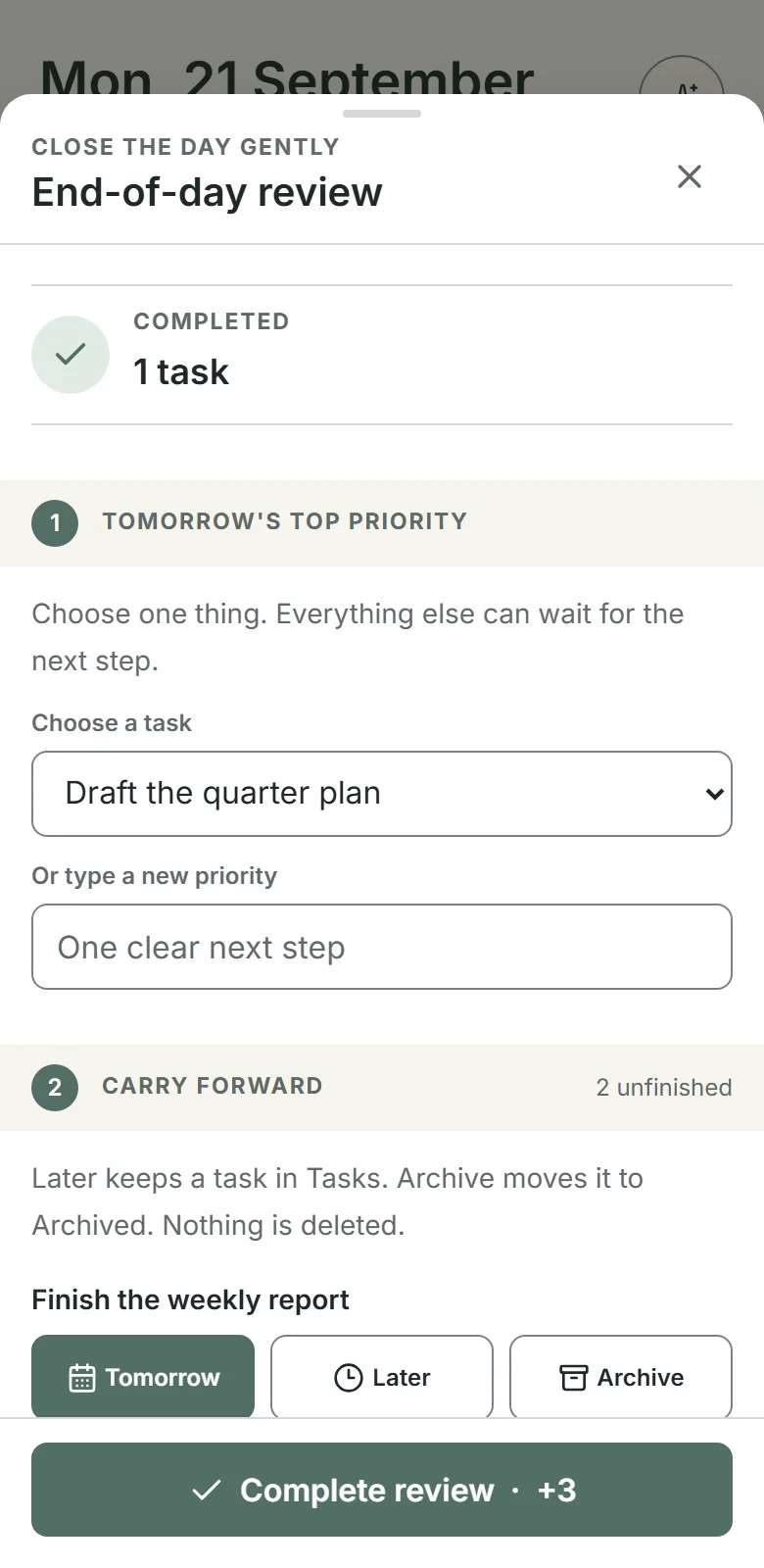
You do not need to finish everything before reviewing the day. Tap the End-of-day review row on Today. The whole row opens the review. Dayprints shows how many tasks you completed, the unfinished tasks from today's plan, and anything still in Needs attention — all of them together, because any one of them can keep the day from closing.
Once you have finished a review, the row reads Reflection saved and still opens, so you can go back and change today's saved reflection.
The row stays at the foot of Today whatever the day looks like, including after you have finished everything and after you have closed the day, so it is always in the same place. On the clear-day Today view the review also appears in the main heading. Select Close the day when Today says the day can close; otherwise, select Review the day to open it. You can decide Needs attention items inside the review itself, or from their own list: select Review items, or select an item's row, to open Plan. There, choose Tomorrow to plan an item for tomorrow, Pick date to plan it for a date you choose, or Archive to archive it. The date picker opens on today, and all three choices remove the item from Needs attention. A task planned for today joins today's plan and must be completed before the day can close.
An item you never decide leaves Needs attention on its own once it is more than seven days past its due date, or past the day it was planned for. It stays in your task list; it simply stops holding the day open. Deciding an item moves that date forward, so an item you keep deciding never ages out this way.
Prepare tomorrow
Choose tomorrow’s top priority from an existing task or create one. This gives the next day a clear starting point without building a full plan.
The picker marks tasks overdue, due today, or planned today, using the date of your review. A due-date label takes precedence over planned today; future deadlines add no due-date label, but a task planned today can still show planned today.
Completing the review plans that task for tomorrow and puts it first in Up next and Your Top 3 the next morning. This replaces any earlier focus order for tomorrow and clears a snooze on the chosen task. The remaining tasks keep their usual order, with due and overdue work first. You can choose a different focus later.
Decide what else comes along
If your chosen priority also appears among unfinished tasks, its row reads Tomorrow · your priority. Its carry-forward choices are unavailable because it is already going to tomorrow. Clear or change the priority to restore those choices, with no choice selected.
For each other unfinished task — from today's plan or from Needs attention — choose:
- Tomorrow when you are making a real commitment;
- Later when it remains valid but does not belong tomorrow; or
- Archive when it is no longer worth carrying.
Later keeps the task in Tasks without a planned day. Choosing Archive uses the same archive-and-restore behaviour as archiving a task elsewhere.
Add an optional reflection
You can answer three optional prompts: one thing you are grateful for, one thing you appreciate about yourself, and something you are moving toward. Each answer can be one line or a short journal entry, with up to 1,000 characters — about 160 words. The field grows as you write, and a count appears near the limit. The prompts are skippable.
Read your reflections back
Your answers are not written once and lost. The Reflection journal at the foot of Progress gathers them by the question that prompted them—Grateful, Self-appreciation, and This year—newest first. Free shows the most recent 90 days; Plus shows the full saved history. Nights you skipped a prompt add nothing to that thread, and a prompt you have never answered does not appear at all.
This year behaves differently on purpose, because it is usually the same intention restated rather than a fresh thought. Restating it unchanged on the days that follow keeps one entry and widens its range of dates; rewording it starts a new entry. Only a run of consecutive days is joined, so returning to earlier wording weeks later starts another entry rather than reopening the first. The day your wording moved is the thing worth seeing.
Complete the review
The review can earn up to 3 Momentum once per local day when you make at least one real input: set tomorrow’s priority, decide an unfinished task, or write an answer to a reflection prompt. A blank tap earns nothing.
After you complete the review, Today shows Reflection saved. Open the row again, or select Edit reflection in the clear-day heading, to reopen today’s saved reflection, change or add to it, and save it again.
Saving an edit earns no additional Momentum; the review award remains limited to once per local day. Only today’s review is editable. Reviews from earlier days stay closed.
A day cannot close while anything sits in Needs attention, so the review lets you decide those items too, alongside today's unfinished tasks. You can still resolve them one at a time from their own list if you prefer.
A day closes and mints a Dayprint only when every planned task is complete, at least one task you had planned — for any date, not only today — was completed today, and Needs attention has no unresolved items. The review itself never gates your Dayprint or completed-day celebration. Use it when closing the day would make tomorrow lighter.
Put this into practice with Dayprints. Plan what matters today and collect a dated artwork for each day you finish.
Works in your browser. Add it to your phone's home screen whenever you like and use it like an app.